Is Your Oxwall Site Protected? The Critical Security Update You Didn’t Know You Needed


The original .htaccess provided by Oxwall was a great starting point years ago, but the web has changed. Today, we are releasing an Essential Security & Performance Update for this file that every administrator should implement immediately.
What is an .htaccess file, anyway?Think of it as the Security Guard at the entrance of your building. It decides who can enter, which paths are private, and how fast the "mail" (your data) is delivered. If your guard is using old instructions, your site is slower and more vulnerable than it needs to be.
Why should you upgrade today?Our newly optimized version brings three massive improvements to your site:
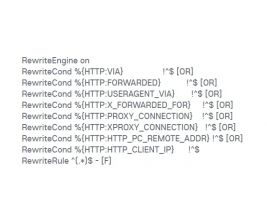
Surgical Security (The Shield): The original file leaves many "back doors" open. Our update explicitly blocks access to sensitive files like database backups (.sql), configuration files, and system logs. It also includes a Request Shield that stops common hacking attempts (XSS and Injections) before they even reach your database.
Blazing Speed (The Turbo): We’ve added advanced Gzip compression support. This tells the browser to download smaller, compressed versions of your Javascript and CSS files. The result? Faster loading times and a better experience for your users.
Modern Standards: Technology evolves. This update includes compatibility for modern image formats (like WebP) and updated rules for Apache 2.4+ servers, ensuring your site stays stable on high-end hosting environments.
You don’t need to be a programmer to do this. Just follow these steps:
Backup: Log into your server via FTP or File Manager and download your current .htaccess file (it’s located in the root folder of your Oxwall installation).
Replace: Open the file with a text editor (like Notepad), delete everything inside, and paste the new "Ultimate Security & Routing Config."
Save: Upload it back to your server.
The Bottom LinePro Tip: If you have a custom folder like /zipstore or private directories, our update allows you to lock them down completely with just one line of code, making it impossible for unauthorized users to "guess" your file URLs.
In the world of web administration, "set it and forget it" is a dangerous mindset. By spending 2 minutes updating your .htaccess, you are giving your Oxwall site a professional-grade armor and a performance boost that your users will notice.
Don't wait for a security breach to happen. Upgrade your gatekeeper today!
# ----------------------------------------------------------------------
# Oxwall Ultimate Security & Routing Config
# ----------------------------------------------------------------------
# Options +FollowSymLinks
RewriteEngine On
# --- 1. Gzip Static Assets Support ---
# Serves pre-compressed files (.gz) to reduce server load and latency
AddEncoding gzip .gz
AddEncoding gzip .gzip
<FilesMatch "\.(js\.gz|js\.gzip)$">
ForceType text/javascript
</FilesMatch>
<FilesMatch "\.(css\.gz|css\.gzip)$">
ForceType text/css
</FilesMatch>
# --- 2. Security: Headers & CORS ---
# Prevent cross-site image hijacking and basic security headers
<FilesMatch "\.(jpe?g|png|gif|webp|ico)$">
Header set Access-Control-Allow-Origin "*"
</FilesMatch>
# --- 3. Security: Critical File Protection ---
# Blocks access to system files, database dumps, and sensitive logs
<FilesMatch "\.(json|config\.php|log|sh|sql|bak|inc|ini|tpl)$">
<IfModule mod_authz_core.c>
Require all denied
</IfModule>
<IfModule !mod_authz_core.c>
Order allow,deny
Deny from all
</IfModule>
</FilesMatch>
# --- 4. Security: Request Shield (XSS & Injection) ---
# Blocks malicious query strings before they reach the PHP engine
RewriteCond %{QUERY_STRING} (<|%3C).*script.*(>|%3E) [NC,OR]
RewriteCond %{QUERY_STRING} GLOBALS(=|\[|\%[0-9A-Z]{0,2}) [OR]
RewriteCond %{QUERY_STRING} _REQUEST(=|\[|\%[0-9A-Z]{0,2}) [OR]
RewriteCond %{QUERY_STRING} proc/self/environ [OR]
RewriteCond %{QUERY_STRING} base64_(en|de)code [NC]
RewriteRule ^(.*)$ index.php [F,L]
# --- 5. Oxwall Core Routing ---
# Exclude system-critical files from the rewrite engine
RewriteCond %{REQUEST_URI} !^/index\.php
RewriteCond %{REQUEST_URI} !/ow_updates/index\.php
RewriteCond %{REQUEST_URI} !/ow_updates/
RewriteCond %{REQUEST_URI} !/ow_cron/run\.php
RewriteCond %{REQUEST_URI} !/e500\.php
RewriteCond %{REQUEST_URI} !/captcha\.php
# Match SEO-friendly URLs and specific file extensions
RewriteCond %{REQUEST_FILENAME} (/|\.php|\.htm|\.feed|robots\.txt|sitemap\.xml|\.raw|/[^.]*)$ [NC]
RewriteRule (.*) index.php [L]
Comments:
 Admin
Admin